Why we built our own sandboxing system

From Basic Containers to Multi-Layered Containment: The Five-Layer Defence Behind Greyhaven’s Sandbox: Greywall
Your AI Agent Is Not You
Every process on your machine runs with your permissions. Your CLI agent can read your SSH keys, your cloud tokens, your .env files, your git history. This is just how Unix-based systems work. Every process running under your UID is treated as you.
Unix wasn't designed with the idea that someone other than you might want to act on your behalf inside of a process. But this is an increasingly common paradigm: I want a process to act on my behalf inside my computer, using a language model to generate text that will be executed in a command line.
AI agents decide what to do at runtime. It reads files to build context, installs packages, makes network requests, spawns subprocesses. It does all of this at machine speed, guided by a model you didn't train, running on infrastructure you don't control.
Like many, we set out to build software that would help us regain control. And over the course of a year and a half, that solution evolved from a simple script that spun up docker containers on command, to a solution with five layers of OS-level defense, and a transparent network proxy that shows you every connection in real time and lets you allow or deny it without restarting anything.
When we first turned it on, the results were immediate. We discovered telemetry to domains we didn't expect. CDN requests from tools we thought were fully local. Registry checks we never authorized. None of it was malicious, but all were data exfiltration vectors that were invisible to us until now.
This article is about:
- What we discovered
- Why conventional sandbox approaches fall short
- What we built instead
- What “good” looks like for agent control
A quick note on terminology: when we say "CLI agents," we mean tools like Claude Code, OpenCode, Goose, Cursor, and Codex that run locally and execute commands on your machine, as opposed to server-side autonomous agents or web ui chatbots. These are tools with shell access, running as your user, inside your OS environment.
Why We Took This Road
The Container Chapter

We started where most people start. We built Cubbi, a Docker-based tool that shipped pre-configured container images for Claude Code, OpenCode, Goose, Aider, and other CLI agents. It handled uniform LLM configuration, MCP server setup, and session management. Onboarding was fast. The idea was simple: put the agent in a box, control the box.
As a basic container wrapper, Cubbi worked. You could spin up a session with your CLI agent of choice and start working.
The problem was that by default, there were no network restrictions. The container had full internet access, which meant the model could download and install anything inside its container environment. And it could send data anywhere.
So we added domain filtering: an iptables sidecar container with dnsmasq to restrict which domains the agent could reach.
But then Docker's networking model fought against us. Using network_mode: container:... to share the sidecar's network namespace meant the session container could no longer join Docker networks. MCP servers became inaccessible. We tried environment variable proxies, side containers, different network configurations. Each attempt broke something else.
And in addition, the images themselves were too brittle. Each tool needed its own Dockerfile with its own stack -- Node.js for one, Python for another, specific system libraries, specific versions. When a tool updated its config format or added a dependency, the image broke. Rebuild, try again, doesn't work, rebuild again. A treadmill of maintenance for five tools that all update on their own schedules.
The developer experience compounded the problem. By running the CLI agent inside a container you lose your normal shell, your normal tools, your normal workflow.
Need a tool you didn't include? Kill the session, rebuild dependencies, restart. Lose your context. Want access to your dotfiles? Want your SSH agent? Every small convenience requires explicit plumbing and actively disrupting your flow.
We solved all of those pain points through increasing layers of automation, but at one point, we realized that much of our own team wasn't bothering with cubbi: the UX was too clunky, and the security gains weren't worth it.
We came to the conclusion that containers are excellent for stable services with known dependencies, but CLI agents on your development machine are the opposite: unpredictable, fast-changing, deeply integrated with your local environment.
The Namespace Chapter
We then went looking for someting that could live alongside other tools in our own environment. The project we liked the most was called Fence, an open-source tool from Use-Tusk.
Similar in spirit to Anthropic's sandbox-runtime: bubblewrap on Linux, sandbox-exec on macOS. Lightweight, no containers. It wraps existing tools with OS-native sandboxing primitives. And it already had real depth -- seccomp BPF for syscall filtering, Landlock for kernel filesystem enforcement, eBPF for violation monitoring. This was a serious sandbox, not a toy wrapper. We forked it and started playing around.
This was a clear upgrade in terms of usability! Now we could run tools with a simpler, software-defined sandbox. We had access to our normal tools, and didn't have to constantly rebuild and manage docker sessions.
But Fence fell short for us when it came to network control and discoverability.
Fence runs its own HTTP and SOCKS5 proxies with domain filtering, but they rely on programs respecting HTTP_PROXY environment variables. Programs that make direct connections, such as raw sockets, custom HTTP clients, embedded runtimes, bypass the proxy entirely. So whole categories of network activity were unchecked and insecure.
What We Think Good Looks Like

And so we went back to the drawing board. What did we want from a sandbox, exactly? What were the properties we wanted it to have? We came up with these:
Use your normal environment. Your shell, your tools, your configs. If adopting a security tool means rebuilding your development setup inside a container, most won't adopt it. And the ones who do will spend too much time maintaining images and updating configurations.
Default-deny everything, explicit-allow what's needed. No network unless you say so. No filesystem writes unless you say so. The safe path must be the default path.
See what's happening. A sandbox that silently blocks without telling you what it blocked is maddeningly frustrating, and a sandbox that silently allows anything is insecure. So every request on the network or filesytsem should be visible. Then you can decide what's acceptable after seeing it, in context.
Adjust dynamically. No stop-config-rebuild-restart loop! If we see a request on the dashboard, we should be able to allow or deny it in real time. The sandbox should adapt to what the tool actually needs, in real time. Visibility is half the battle, but the ability to update rules at runtime is what makes the sandbox really feel good to use.
Defense-in-depth. Multiple orthogonal security primitives, each covering a different attack surface. Every layer we built had bugs, and we were able to catch bugs because another layer was watching.
The GreyHaven Sandbox Model
The GreyHaven sandbox model has two parts. Greywall handles process-level sandboxing -- the layers that restrict what a command can do. Greyproxy handles network observability and dynamic authorization -- the dashboard that shows you what's happening and lets you respond in real time.
Greywall - Layered Process Sandboxing
On Linux, we compose five layers. Each addresses a distinct concern that the others cannot.
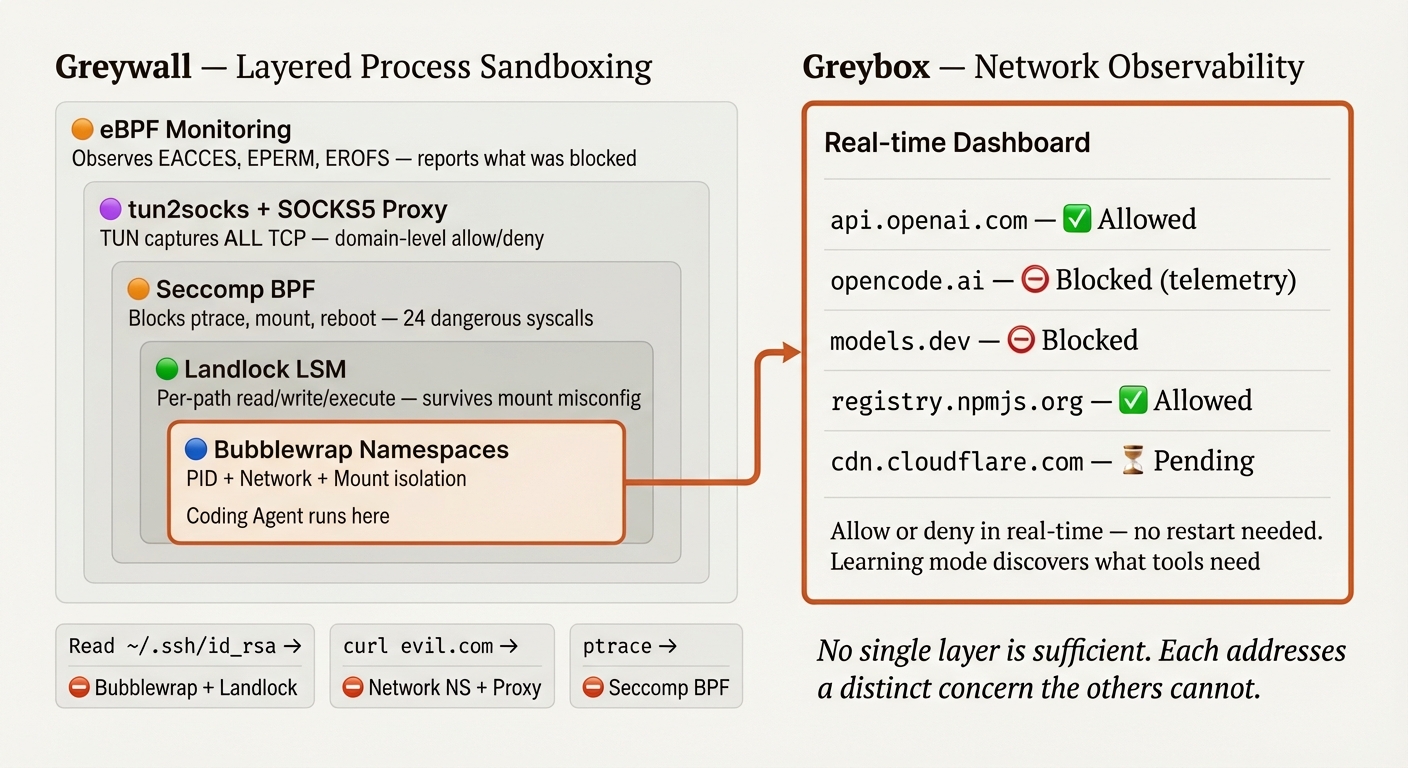
| Concern | Layer | Why this one |
|---|---|---|
| Process and network isolation | Bubblewrap (namespaces) | Only namespaces can create a separate network stack and PID space |
| Filesystem access rights | Landlock (kernel LSM) | Only a kernel LSM enforces access control that survives mount misconfiguration |
| Dangerous syscall blocking | Seccomp BPF | Only seccomp can block ptrace, mount, reboot at the syscall level |
| Violation visibility | eBPF (bpftrace) | Only kernel tracing sees denied operations across all layers |
| Network control | tun2socks + SOCKS5 proxy | Captures ALL traffic transparently via gVisor's user-space TCP/IP stack |
The key word is orthogonal. Seccomp and Landlock, for example, protect against completely different threat classes. Seccomp filters by syscall number; it can block ptrace or mount, but it cannot make path-based decisions. It has no idea whether an openat call targets /home/user/.ssh/id_rsa or /tmp/safe.txt. Landlock is the opposite: it controls filesystem access per path and per operation (read, write, execute, delete), but it knows nothing about network operations, process tracing, or kernel module loading. Using only one leaves an entire class of attacks unaddressed.
Bubblewrap and Landlock deliberately overlap on filesystem protection. Bubblewrap controls what's visible (unmounted files don't exist). Landlock controls what's accessible (mounted files can still be denied). The overlap is intentional. If a bubblewrap mount is misconfigured, a symlink edge case, a mount order issue and Landlock still denies access. Two independent mechanisms with different failure modes. Both must fail for access to be granted.
Here's what that looks like in practice, across common attack scenarios:
| Attack | First defense | Second defense | Reported by |
|---|---|---|---|
Read ~/.ssh/id_rsa |
Bubblewrap: file not mounted (ENOENT) | Landlock: no READ_FILE right (EACCES) | eBPF logs the denial |
Write to .env |
Bubblewrap: masked with empty file | Landlock: no WRITE_FILE right (EACCES) | eBPF logs the denial |
curl evil.com |
Network namespace: no host network | tun2socks routes through proxy, proxy denies | eBPF logs ECONNREFUSED |
ptrace a process |
Seccomp: syscall blocked (EPERM) | -- | eBPF logs the denial |
mount /dev/sda |
Seccomp: syscall blocked (EPERM) | -- | eBPF logs the denial |
A note on macOS. On macOS, Apple's Seatbelt (sandbox-exec) covers more ground in a single layer -- filesystem, network, IPC, and hardware access in one profile. It's enforced by the same kernel framework that enforces System Integrity Protection. In some ways it's elegant: one policy engine instead of five composable layers. The trade-off is less defense-in-depth. If the Seatbelt profile has a misconfiguration, there's no fallback layer. macOS also lacks PID namespaces, transparent network proxying without root, and learning mode equivalent to Linux's strace. We're honest about these gaps. Different OS, different constraints, different trade-offs.
Greyproxy - Network Observability and Dynamic Control
Greywall restricts what a process can do. Greyproxy shows you what it's trying to do.
On Linux, all network traffic from a sandboxed process goes through a transparent proxy pipeline: the process's network namespace is isolated (no host network), a TUN device captures every packet at the kernel level, tun2socks routes all traffic through a SOCKS5 proxy, and the proxy applies domain-level filtering. The word transparent matters. The process doesn't need to be configured to use a proxy. It doesn't need to respect HTTP_PROXY environment variables. Every TCP connection, every DNS query, every packet are captured at the kernel level, before the application sees the network.
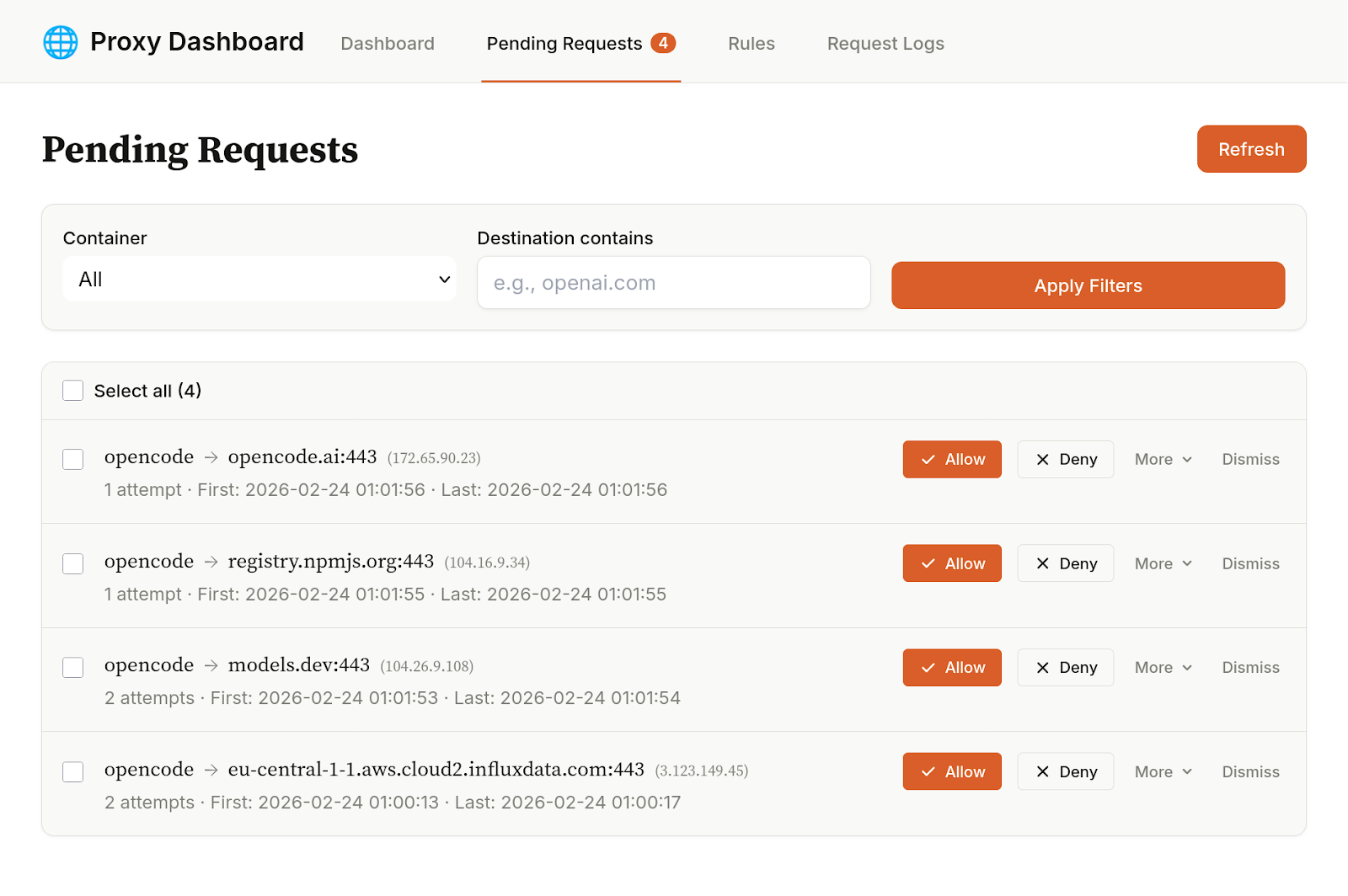
When we ran OpenCode through Greyproxy, we saw telemetry requests within seconds. We didn't need to read source code, intercept packets, or attach a debugger. The proxy showed us every outbound connection: the domain, the port, the timestamp, whether it was allowed or denied.
Could we have found this by reading OpenCode's source code? Probably. Could we have dug through its documentation? Perhaps. But do we want to do that for every tool, every dependency, every update? And trust that they are correct? And what about proprietary tools where you can't read the source?
A traditional firewall would log IP addresses and port numbers. Useful, but not enough -- you'd see a connection to 104.18.x.x:443 and have to guess the domain. With a proxy, we know who (which tool or container), where (the actual domain, not just an IP), and whether the request was allowed or denied. This is not about static configuration "falling apart." It's about static configuration being hard to write when you don't know what a tool accesses. Some of those requests may be necessary, some may not. With this tool, we can see them and decide for ourselves.
Learning mode mitigates the filesystem discovery problem. With most sandboxes, you need to know up front which paths a tool requires. But as a user, you don't know what OpenCode reads from ~/.cache/opencode/ or that it needs write access to ~/.local/state/opencode/. Learning mode discovers this for you: run the command once permissively, and strace traces every filesystem operation. Greywall parses the log, collapses the paths into minimal directory sets, filters out sensitive locations, and generates a config template.
Here's what that actually looks like when we ran OpenCode:
$ greywall --learning -- opencode
[greywall] Learning mode: tracing filesystem access for "opencode"
[greywall] WARNING: The sandbox filesystem is relaxed during learning.
           Do not use for untrusted code.

[greywall] Analyzing filesystem access patterns...

[greywall] Discovered read paths:
[greywall]   ~/.local/share/opencode/auth.json
[greywall]   ~/.cache/opencode/version
[greywall]   ~/.config/opencode/config.json
[greywall]   ~/.config/opencode/opencode.json
[greywall]   ~/.local/state/opencode/kv.json
[greywall]   ~/.local/share/opencode
[greywall]   ~/.cache/opencode/node_modules/...  (70+ files)
[greywall]   ~/.cache/opencode/models.json
[greywall]   ~/.local/state/opencode/model.json
[greywall]   ~/.local/state/opencode/prompt-history.jsonl
[greywall]   ~/.gitconfig

[greywall] Discovered write paths (collapsed):
[greywall]   ~/.cache/opencode
[greywall]   ~/.local/share/opencode
[greywall]   ~/.local/state/opencode

[greywall] Generated template:
[greywall]   {
[greywall]     "filesystem": {
[greywall]       "allowWrite": [
[greywall]         ".",
[greywall]         "~/.cache/opencode",
[greywall]         "~/.local/share/opencode",
[greywall]         "~/.local/state/opencode"
[greywall]       ],
[greywall]       "denyWrite": [
[greywall]         "~/.gitconfig", "~/.bashrc", "~/.zshrc",
[greywall]         "~/.profile", "~/.mcp.json"
[greywall]       ],
[greywall]       "denyRead": [
[greywall]         "~/.ssh/id_*", "~/.gnupg/**",
[greywall]         ".env", ".env.*"
[greywall]       ]
[greywall]     }
[greywall]   }

[greywall] Template saved to: ~/.config/greywall/learned/opencode.json
[greywall] Next run will auto-load this template.
Seventy-plus node_modules files, auth tokens, cached models, state directories -- all discovered automatically. Without learning mode, you'd be writing this config by hand through trial and error.
Note that this assumes that the binary can be trusted not to make evil filesystem calls the first time you invoke it. If you don't want to make that assumption, you'll have to manually configure the config file in advance.
Dynamic network authorization is the real-time complement. See a network request on the Greyproxy dashboard that you haven't pre-approved. It's blocked, but visible. Allow it. The proxy updates its allowlist immediately. No restarting, no config file editing.
This combination -- learning mode for filesystem discovery, dynamic authorization for network control -- means you don't need to predict everything up front. The sandbox helps you figure out what the tool needs, then enforces exactly that. It's a far, far more ergonomic solution than using containers, and at least for our team, has pushed the sandbox over the inflection point to where the security/convenience tradeoffs is generally worth it.
A Window With a Lock

Most sandboxes are walls. You declare allowed domains, list writable paths, start the process, and hope you got it right. When the tool needs something you didn't predict, it fails. You stop, edit the config, restart. This works for stable workloads: CI pipelines, self-hosted services, locked-down containers.
CLI agents are not stable workloads. Their behavior changes every run. Different prompts, different tools, different network requests. You install a new MCP server and suddenly there are connections to a domain you've never seen. A tool updates and adds a new analytics endpoint. You cannot predict what your agent will reach for. You need to watch it reach, and then decide.
What we built is more like a window with a lock. Every outbound connection is visible on a dashboard, and every filesystem access is logged. The default is closed. Opening it is an explicit, informed decision, made in real time, without restarting the session.
The outcome is a major improvement in velocity. Once we could see what our agents were doing and control it without interrupting the flow, we stopped hesitating. Longer autonomous runs. More sub-agents.
Feeling like we can trust the agent to handle sensitive data means we can iterate much more quickly on sensitive workloads.
The company providing your model has every incentive to make the sandbox permissive enough that the model works smoothly. That's not malice, just misaligned incentives.
We strongly feel that the security layer around your AI tools should be independent of the company selling you the AI, for the same reason you shouldn't let a bank audit itself.
GreyHaven builds secure AI systems inside your organization -- private by design, fast by default. The sandbox model described here is one part of a broader platform: private AI assistants, workflow automation, knowledge systems, all deployed inside your environment. If you want to see what your tools are doing, start a conversation.
Appendix: What Others Are Building
Different problems call for different solutions. The sandbox landscape is diverse because the threat models are diverse. Here's what we see, and why we chose a different road.
Cloud microVMs -- E2B, Vercel's v0 sandbox, Together, RunLoop, Daytona. Each execution gets its own kernel via Firecracker or similar. This is the strongest isolation boundary available: a full virtual machine, spun up in milliseconds, torn down after use. If you're running completely untrusted code at scale -- arbitrary user submissions, automated code execution as a service -- this is the right model. The isolation is real. The trade-off is also real: cloud-only, session time limits, no persistent developer environment, no access to your local tools and configs. Different problem, solved well.
gVisor -- Modal, Google's Agent Sandbox on GKE. gVisor is modular: its container runtime (runsc) intercepts all syscalls in user space, providing strong isolation for cloud workloads. Modal and Google use runsc within Kubernetes. But gVisor also has a standalone user-space TCP/IP stack (netstack) designed for library use -- and it's used more broadly than people realize. tun2socks, which powers Greywall's transparent network proxy, is built on gVisor's netstack. So we use gVisor technology ourselves, just a different part of it. The runsc container runtime solves a different problem than we're solving -- it's designed for running untrusted workloads in managed infrastructure, not for wrapping CLI agents on a developer's laptop.
OS-level sandboxes -- Anthropic's sandbox-runtime, Fence. The closest to our approach. Lightweight, local, using native OS primitives (bubblewrap, sandbox-exec). No containers, no VMs, wraps existing tools. This is the right category. Fence in particular has real depth -- seccomp, Landlock, eBPF, built-in proxies with domain filtering. But these tools use static configuration: you declare allowed domains and filesystem paths up front. If the tool needs something you didn't predict, it fails. You stop, adjust the config, restart. No dashboard showing what's happening. No learning mode to discover what the tool needs. And the network filtering relies on programs respecting proxy environment variables -- applications that make direct connections can bypass it. Solid enforcement, limited visibility.
| Criterion | Cloud MicroVMs | gVisor runsc (Modal, GKE) | OS-level (Anthropic, Fence) | GreyHaven (Greywall + Greyproxy) |
|---|---|---|---|---|
| Use your normal environment | No -- ephemeral VM | No -- managed infra | Yes | Yes |
| Default-deny | Yes | Yes | Yes -- network + filesystem | Yes -- network + filesystem |
| Observability | Logs after the fact | Logs after the fact | eBPF monitoring, proxy logs | Real-time dashboard + learning mode |
| Dynamic adjustment | No -- redeploy | No -- redeploy | No -- restart with new config | Yes -- live network allow/deny |
| Network capture | Full (own kernel) | Full (user-space kernel) | Proxy-env-var based (bypassable) | Transparent (tun2socks, all TCP) |
| Works locally | No | No | Yes | Yes |
| Best for | Untrusted code at scale | Managed cloud workloads | Lightweight local sandbox | Dev tools with observability |
Each approach makes a trade-off. Cloud microVMs and gVisor trade local workflow for stronger isolation. OS-level sandboxes trade depth for simplicity. Our trade-off is: shared kernel (weaker isolation boundary than a full VM) in exchange for observability, dynamic control, and zero friction with your normal development environment.
We are clear about that trade-off. If you're running adversarial malware, use a microVM. If you're running CLI agents on your development machine and want to see what they're doing, keep reading.
Expert data scientist, ex-pro poker player, full-stack engineer, founder.
A full-stack developer who enjoys art and design in both software and music.